

Ergocan Product Proofs
Custom WooCommerce proofing flow for printed recycling products, built directly into product pages so customers can upload artwork, see a preview, and place an order with the right proof details attached.
- Timeline2026
2-month delivery
- PlatformWordPress + WooCommerce
Custom plugin for an existing online store
- IntegrationsImagick + WooCommerce
Artwork previews connected to the product order flow
- DeliveryDevelopment Team
Upload flow, preview logic, checkout data
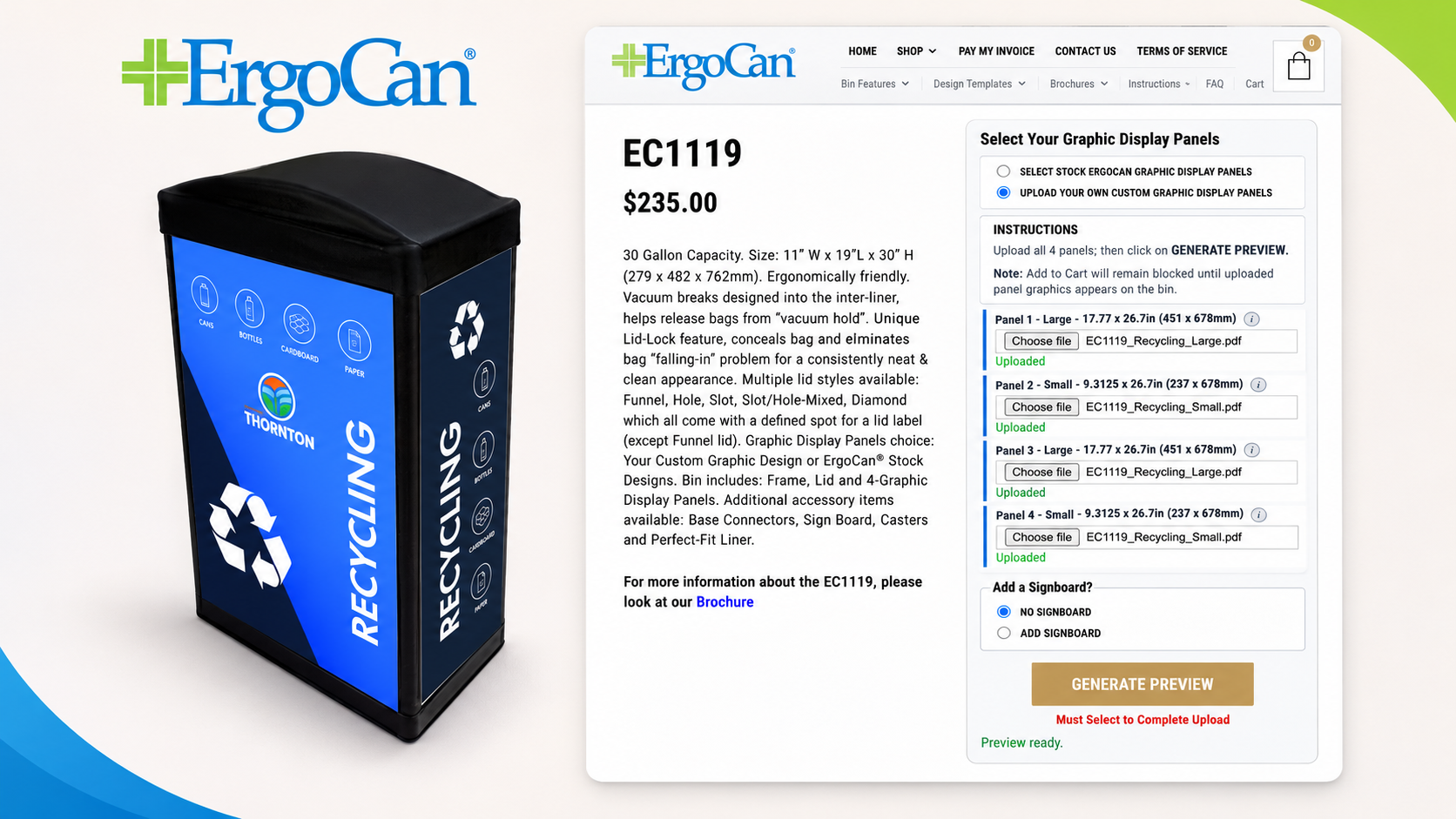
A simpler way to order custom printed products
Ergocan needed customers to choose artwork, upload files, review a preview, and complete checkout without losing important proof details along the way.
How customers order
Buyers choose stock or custom artwork, upload the required print files, generate a preview, and then continue to checkout.
Why it matters
The process is easier for customers, fits the store design, and keeps artwork details clear for orders and fulfillment.
The proof flow had to work inside the real store
The proofing step could not behave like a separate tool. It had to follow the same product, variation, cart, and checkout rules as the rest of the WooCommerce store.
- The preview and Add to Cart button needed to agree on when a product was ready to buy.
- Custom orders needed to show the files the customer actually uploaded, not old stock-design details.
- The flow needed to keep working when customers opened more than one tab or repeated steps.
- Upload errors needed clearer messages so support could understand what went wrong faster.
A custom plugin that fits the store instead of working around it
The Development Team rebuilt the proofing flow around the product page, checkout, and order data customers already use.
Proofing on the product page
- Customers can choose artwork, upload files, and generate a preview on the product page.
- Add to Cart stays locked until the proof is complete and the selected product can really be purchased.
- The interface was simplified and styled to match the existing store.
- Cart and order details now show cleaner information for custom artwork orders.
More reliable orders
- The proof process works better when customers repeat steps or use more than one browser tab.
- Upload checks and error messages were improved so issues are easier to understand.
- Server-specific upload issues were resolved during staging.
- The custom plugin keeps the proofing logic in one place, making future changes easier.
From artwork choice to checkout
The final flow keeps each step clear, so customers know what to upload and when the product is ready to buy.
Step 01
Source
Choose stock design or custom artwork.
Step 02
Upload
Upload required PDF panels for selected mode.
Step 03
Validate
Validate file and panel requirements.
Step 04
Preview
Generate proof preview before purchase.
Step 05
Cart
Unlock Add to Cart when the proof is ready.
Step 06
Order
Save proof details with checkout and order data.
A clearer proofing flow for customers and store staff
Need a custom WooCommerce flow that is easier for customers to use?
We build custom WordPress and WooCommerce features that fit the way your store, team, and customers already work.